Archive for the ‘General’ Category
How Commercial Real Estate Pro Allen Buchanan Uses Social Media

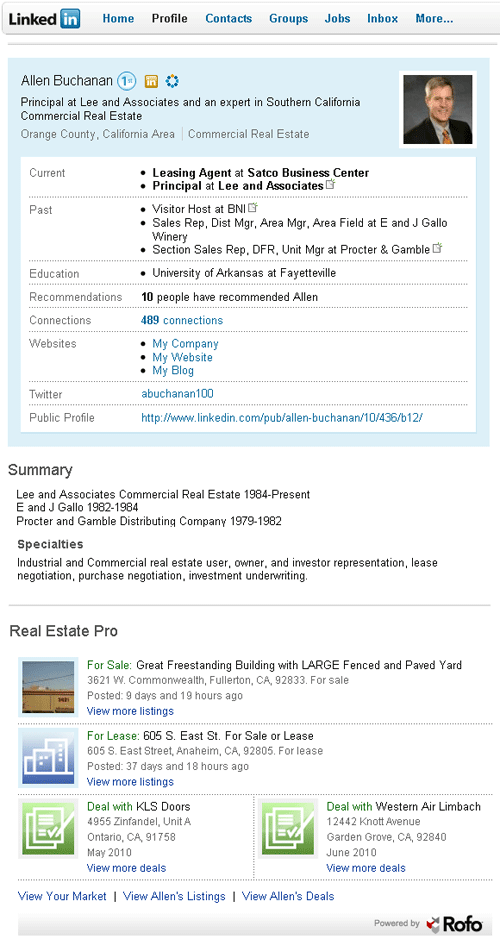
Allen Buchanan is a commercial real estate professional specializing in the Orange County industrial market. As a Principal at Lee & Associates, Allen is always exploring new and innovative uses of social media, including ways to: enhance current business relationships, grow his professional network and share his business knowledge online.
How are you using social media to market your services?
I blog on a daily basis through http://www.allencbuchanan.blogspot.com. I experiment with different content based upon my experiences, contacts, companies that I have represented, etc.
Once the blog posts, I then tweet it which posts to LinkedIn. I then share the blog to groups [on LinkedIn] that I believe would benefit from the content. My blog posts automatically are shared with Facebook. My blog is hyperlinked to Postlets for my listing inventory, my company website and contains links to Facebook and Twitter.
I use past blog posts to introduce clients to one another and/or to market their businesses.
Do you have any creative ways you prospect online?
LinkedIn Groups, birthday cards from Plaxo
Any early insights you can share on using the new Real Estate Pro application on LinkedIn?
I like the ability to post listings and done deals on my LinkedIn profile, so that a user can view them.
What blogs or websites do you check daily?
What deals have you closed in the last 3 months?
#1- Sale of a property in April that took me 6.5 years to close
#2- I helped relocate a sunscreen manufacturer and saved him $40,000 per month in rent
What’s the most interesting property request you’ve received?
A buyer that buys and sells traffic from adult websites
Why do your customers enjoy working with you?
I am a business owner just like they are and promote myself accordingly. I provide advice…not just transactional help.
New Rofo Search – A Simpler View of Your Commercial Real Estate Market
We’ve continue to accumulate a lot of good product feedback/ideas and, today, we’re pleased to introduce our new and improved search page. A lot of the changes are subtle but significant. We had a few goals/requirements with this update:
1) simplify the design: we eliminated some under utilized features
2) better highlight key search filters: these are the most important criteria for a business searching for space
3) improve results: the search is now blazing fast and we show the most recently added/updated content FIRST.
Here’s a screen shot for Phoenix office space for rent that highlights the changes:
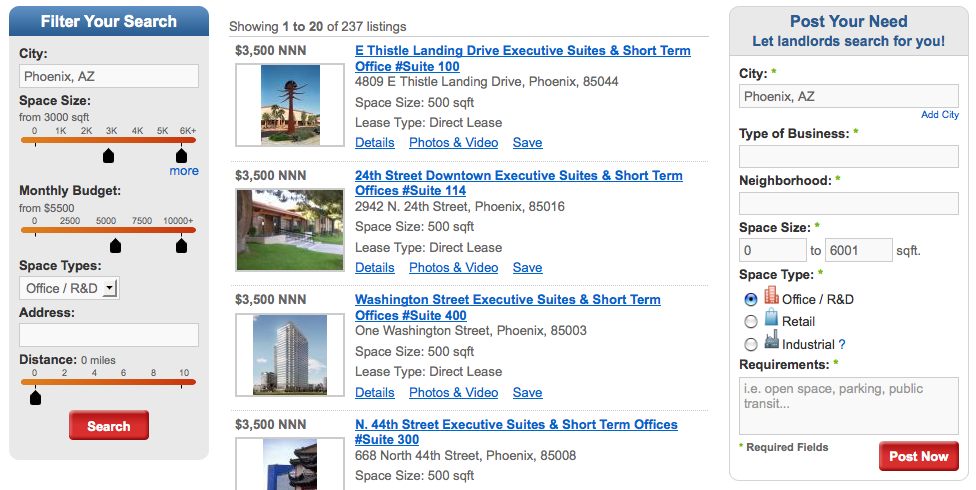
The ability to do a radius search from your home address and/or current office space was somewhat of a hidden feature before. We’ve now added it as a key search filter.
We’re adding some great new features in the coming weeks which we’ll be announcing. As always, keep sending us your product feedback and thanks for using Rofo.
Alan
How commercial real estate professional Tracey Johnson uses social media

Tracey Johnson from Norris & Stevens Inc. discusses how she markets her services and CRE experience online.
How are you using social media to market your services?
I have a website- www.pdxbrokerscommercialinsights.com that I incorporate with all the social media I use: Twitter (PDXComBroker), LinkedIn, Facebook, and my blog which like the website is also titled “PDX Broker’s Commercial Insights“.
How have you marketed your service online? What’s working and what isn’t?
I market myself all over the web and I am constantly trying new websites and advertising platforms. In addition to my website, some parts of the web that I market on more frequently than others are Craigslist, Twitter and Postlets.
I also write as a community blogger for an online news magazine called The Portlander (www.theportlander.com). I find I get a lot of extra traffic to my website every time a new article I have written is posted to The Portlander website.
While some platforms target the audience I am seeking more so than others, all have their differing levels of success. The only things that I feel aren’t working for me are typically the older, non-web based newspaper advertisements.
Any early insights you can share on using the new Real Estate Pro application on LinkedIn?
I feel that it is a great addition to my LinkedIn profile. Not only does it keep my contacts on LinkedIn up to date on my most recent deals and listings, but I can select certain people to send targeted property information to, as well as share trends in the current Portland CRE marketplace.
Why do your customers love you?
From the letters of rec I have received the main reasons I get for why my customers appreciated my work was a) they could reach me at any time and never felt I was ignoring them b) I was never too busy to explain the leasing or sales process to a client, despite how many times I may have already explained the topic to them c) I was very personable, attentive, and upfront with what was needed from them at what time, and what the next step was.
Introducing Commercial Real Estate Professional Justin Carlucci
Justin Carlucci from Sperry Van Ness in Seattle discusses business, social media marketing and how to get a new brokerage business launched!
How is your new team, Jansen Commercial doing?
We are very excited about the team and how quickly we have gotten off the ground. Already we have over a dozen deals under contract in both sales and leasing, as well as in King and Snohomish Counties and including nearly every asset class.
What is the toughest property request you have received?
I was recently working for a medical marijuana collective that was involved in providing information to individuals who have been prescribed medical marijuana. Finding a space for this type of user is an extremely delicate situation since many people have strong stances for or against the use of Marijuana in general.
What blogs or websites do you check daily?
www.JansenCommercialTeam.com
www.commercialmls.com
www.svn.com
www.globest.com
How are you using social media to build a presence online and market your services?
I have a personal Twitter, LinkedIn, and Facebook account, as well as a Twitter account for my Team (Jansen Commercial Team). These accounts are linked to our Coast|Sperry Van Ness/Jansen Commercial Team Blog and notifications are sent out to each social media account when something new is posted on the blog.
Do you currently have the Real Estate Pro application on your LinkedIn profile? What is your LinkedIn profile address?
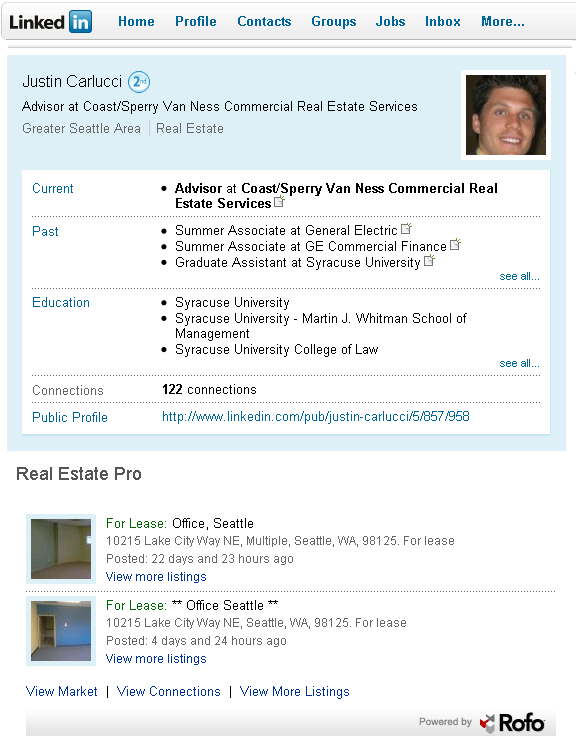
Yes, http://www.linkedin.com/pub/justin-carlucci/5/857/958
Any early insights you can share on using the new Real Estate Pro application on LinkedIn?
Have the Rofo team help you to set it up. From there Real Estate Pro does the rest of the work for you!
What good deed have you done in the past three months?
I paid for a mentally challenged man’s breakfast on Saturday morning when I was out to eat. He was sitting and eating alone and looked like he could really use the help.
Find out how Coy Davidson uses the first real estate application on LinkedIn
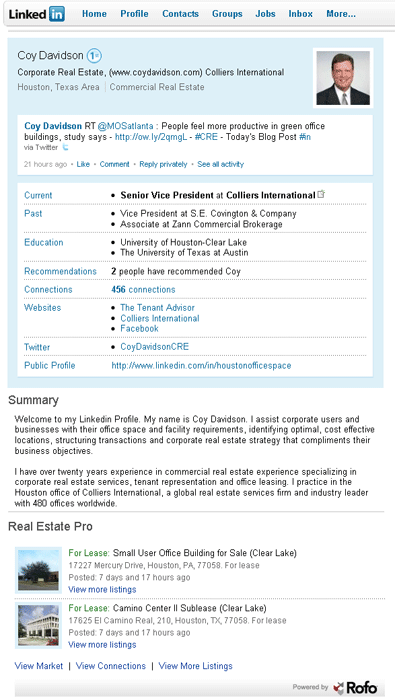
Coy Davidson from Colliers International gives us a few tips on how he uses Real Estate Pro to market his available listings on LinkedIn and keep tabs on professionals in his market.
In addition to adding your listings on LinkedIn using Real Estate Pro, you can feature up to two listing on your LinkedIn profile. Each time Coy feature’s a new listing on his profile, a LinkedIn network update is generated, announcing the new listing to his connections. There are other “social features” to the app as well, such as sharing a listing with up to 50 of your LinkedIn connections.
The app, he says, “…acts as a broker’s professional activity dashboard, populated with real-time property listings, recently closed deals, market data – directly from within a LinkedIn user’s profile page.” Making it easy for Coy to see what professionals in his market are working on.
The application also benefits Coy’s customers and connections, using Real Estate Pro, Coy’s connections can easily stay in touch with his market activity in Houston.
To learn more about the app and its features watch this short video.
Announcing Real Estate Pro for Linkedin
Our mission at Rofo is to simplify the process we all go through to find the right real estate listing and/or connect with the right estate agent or broker to help us out. We do this on Rofo.com with some powerful and unique free tools and have extended that functionality to other platforms and devices like our augmented reality mobile app.
Today I’m excited to announce the launch of our Linkedin app, Real Estate Pro, which blends our real estate search tools and content (the peanut butter) with the Linkedin platform (the chocolate). If you think about it, the process you go through to find real estate, no matter if its residential or commercial space, is social. Beyond your online and offline search, you end up networking with many people (friends, business contacts, and professionals) before eventually connecting with the right agents and the right place. We hear this from our customers and our friends and we’ve experienced it ourselves.
Our solution with Linkedin is simple: give every user of Linkedin a local and social view of their real estate market. Seeing listings is one thing. Seeing who has the listings, how you’re connected to them, and which pro’s are the most active and relevant to your needs is powerful and efficient.
Whether you’re searching for real estate or marketing listings and your expertise, this 2 minute video will give you a quick idea of what you can do with Real Estate Pro:
We hope you enjoy and welcome your feedback.
Rofo’s Building Search: A New Way to Search for Commercial Space
All of us have that ideal building in mind of where we’d like to locate our business. Could be the location, the character, or the other tenants. Maybe you’ve worked in that building before. Or maybe the office rent is known to be downright cheap. There’s a little known feature on our site called building search that lets you keep tabs on that specific building and check for availability.
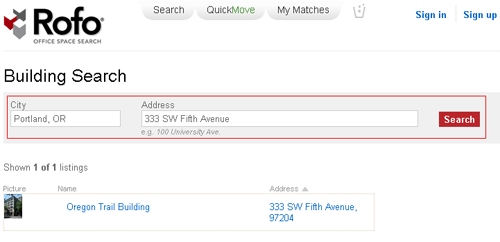
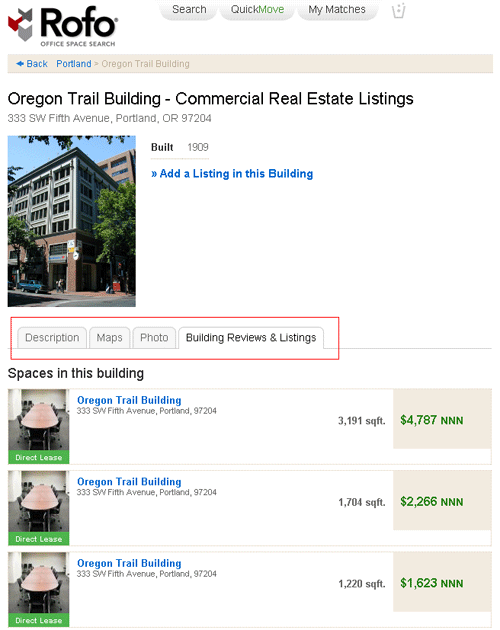
Building pages on Rofo help you decide if a space is right for your business. Building pages, such as the Oregon Trail Building below, feature available office spaces for lease within the building, photographs, area maps and a building description.
Start your Building Search today and find the next space for your business.
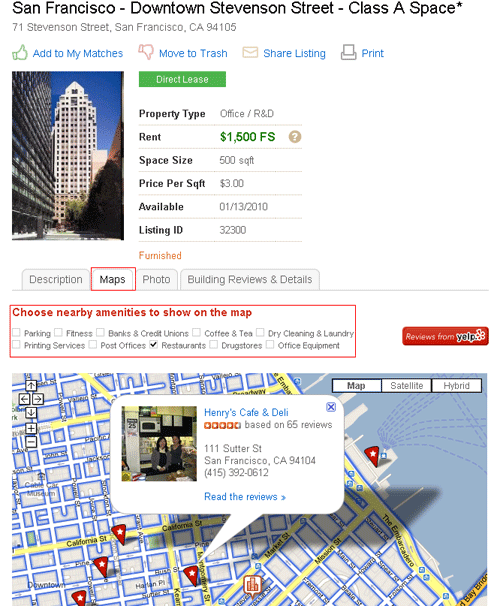
Office Space Listings, Local Amenities and Reviews
No matter what city your business is based in we know that choosing the right office location involves surrounding amenities.
When looking at a listing on Rofo.com, such as the San Francisco – Downtown Stevenson Street – Class A Space below, you can select to see nearby amenities on the map. View local amenities and Yelp Reviews of nearby restaurants, coffee shops, banks, parking facilities and post office locations on the map of each listing detail page on Rofo.com.
Tips on Choosing Broadband & Phone Systems for Your New Office Space

You’ve just spent months searching for an office space to rent for your company. You finally decide on a location and then ask the landlord/broker/property manager “can you recommend a telecom vendor who services this building”. If it were only that easy. We just experienced this headache and thought we’d pass along some helpful advice:
Timing: How quickly you need service is going to drive a lot of decisions. When we moved earlier this year the whole process was fast tracked with just 3 weeks from lease signing to move-in. Budget constraints and bandwidth requirements were important, but the deal breaker was having service on move-in day. To meet our deadlines, we started by asking our landlord for a list of telecom providers who were already authorized to service the building and were in a position to get to work quickly. We were interested in a dedicated circuit (like a T-1), but almost all providers indicated a minimum 4 week lead-time, so we looked for a short term solution. The simplest move for us was to get basic phone lines and DSL service from our local phone company AT&T. The DSL was installed within 10 days and we had a solution for day one and an in expensive back up solution going forward.
Type of internet service: Fast speeds can be had through a number of different options including inexpensive alternatives like DSL, Cable, and some new Fiber Optic services. If you are looking for guaranteed upload and download speeds with service level agreements, you are probably looking for a dedicated circuit. Dedicated circuits start at higher price point (usually north of $400/mo) and often require a long term contract, but they are the solution of choice for businesses where internet is mission critical.
Type of phone system: We decided to explore a Voice over IP (VoIP) phone system which offered us a few key benefits. First off we could avoid an investment in a PBX and instead pay a monthly fee for a full featured business phone (the price is in neighborhood of $30 per phone including voice mail and all the bells and whistles). VoIP phones also offered some flexibility for us in terms of growth – plugging in a new phone for a new employee is simple and does not require a technician visit. The VoIP features are great, but we have discovered that we have lost some of the reliability of a traditional phone line, and our initial experiment using VoIP phones connected to our DSL proved unsatisfactory. We ultimately decided to order VoIP service from SpeakEasy who also provides our T-1 connection – we now have one party controlling the quality of the service and that seems to have made a difference.
So the short answer to “can you recommend a telecom vendor” is: “it really depends”. Drop us a line if you have any questions or want even more specific advice. There’s no reason to keep reinventing this wheel. Do you have your own experience (good or bad) you can share?
Super Powers for Your Office Space Search
If you’ve ever searched for office space you know the painful experience of walking/driving around calling on generic ‘for lease’ signs. You end up calling on 20,000 square foot spaces for your 8 person company. You probably also know that not all available spaces even get a sign on a building (certainly not the sublease space or shared spaces). Well, we think we’ve found a solution to your problem.
Rofo has partnered with Junaio, a new mobile augmented reality platform. And together we have created the first commercial real estate augmented reality mobile application. The free junaio app is currently available for your iPhone 3GS and will soon be available for Android users.
How does it work and what exactly is Augmented Reality?
Simply put, Augmented Reality brings real world objects to life through your mobile device.
Once you download the free app, search for Rofo and subscribe to our channel and you’re ready to go. When looking for an office space, retail location or warehouse for rent, point the camera on your mobile phone at an appealing office building or city block. If there are available commercial spaces icons will appear on your screen. With just a tap of the finger you can now explore properties, email listing brokers, see interior photos, find the exact square footage and price and get directions. All from your mobile phone.
This video quickly shows you how it works:
Here’s a quick recap of the Rofo Channel Features:
- Browse nearby spaces within a specified radius
- View listing details including; photos, price and size of the space
- Email the listing broker or landlord
- Get directions to a listing using Google maps
To access the Rofo Channel download the junaio app on your mobile phone. The junaio application is available for free on the iPhone 3GS.
Good luck with your search and please give us your feedback.